Understanding Neural Networks for Class 10 AI (Finally, an Explanation That Makes Sense!)
The Topic That Confuses Everyone (Until Now)
Hey there! 👋
Let’s be honest: when your teacher first said “neural networks class 10” in AI class, your brain probably went: “Neural what? Networks? Like WiFi?” And then they drew some circles connected by lines and said “This is how AI thinks like a human brain!”
And you thought: “Cool story, but… HOW?”
Here’s the truth: Neural Networks are the most confusing topic in Class 10 AI. I know because I’ve helped hundreds of students who thought they’d never understand it. But here’s the good news:
Neural Networks aren’t actually complicated. They’re just explained badly.
This guide will make you understand neural networks so well that:
- ✅ You’ll ace the 4-6 marks they’re worth in boards
- ✅ You’ll confidently explain them in your viva
- ✅ You’ll actually understand how AI recognizes faces, reads text, and beats humans at games
- ✅ You might even think they’re… cool? (Yes, it happens!)
This is the complete neural networks class 10 guide with visuals, real-world examples, and zero confusing math. Let’s turn your confusion into confidence.
Why Should You Care About Neural Networks?
Board Exam Reality Check
Unit 2 (Advanced Modeling) where Neural Networks live:
- 11 marks total (highest in Part B!)
- Neural Networks questions: 4-6 marks guaranteed
- Usually appears as: Long answer (4 marks) + 2-3 MCQs
Common question patterns:
- “Explain the structure of Artificial Neural Networks with a diagram” (4 marks)
- “What are the layers in a Neural Network? Draw and explain” (4 marks)
- “How does a Neural Network make decisions?” (4 marks)
- “Differentiate between ANN and CNN” (2 marks)
Translation: Master this ONE topic = Easy 6+ marks in theory + impress in viva.
Real-World Relevance
Every AI application you use daily runs on Neural Networks:
Your Phone:
- Face unlock? Neural Network recognizes your face
- “Hey Siri/Google”? Neural Network understands your voice
- Auto-correct? Neural Network predicts your next word
Social Media:
- Instagram filters? Neural Network detects your face
- Facebook tags friends? Neural Network recognizes people
- TikTok recommendations? Neural Network learns what you like
Beyond Your Phone:
- Self-driving cars see roads using Neural Networks
- Doctors detect cancer using Neural Networks
- Netflix knows what show you’ll binge-watch next (Neural Networks!)
Understanding neural networks class 10 concepts means understanding how modern AI actually works.
The Big Picture: What ARE Neural Networks?
The Simple Definition
Neural Network = A machine learning model inspired by how the human brain works
That’s it. That’s the concept.
But let’s make it even clearer with an analogy…
The Coffee Shop Analogy (Best Explanation Ever)
Imagine you work at a coffee shop. Your job: figure out if a customer will order a latte or cappuccino.
How do YOU (a human) decide?
Your brain automatically considers:
- Time of day (morning = latte?)
- Customer’s age (young = cappuccino?)
- Weather (cold = latte?)
- Their outfit (formal = latte?)
Your brain has “learned” patterns from seeing 1000s of customers. You don’t consciously think through each factor – your brain just… knows.
That’s EXACTLY what a Neural Network does!
It looks at inputs (time, age, weather, outfit) and predicts output (latte or cappuccino) based on patterns it learned from data.
The difference? Your brain has 86 billion neurons. An AI Neural Network might have just 100-1000 artificial neurons. But the principle is the same.
How Your Brain Works (Biology Crash Course)
To understand Artificial Neural Networks, let’s first understand Real Neural Networks (your brain).
Your Brain’s Neuron (The Biological Version)
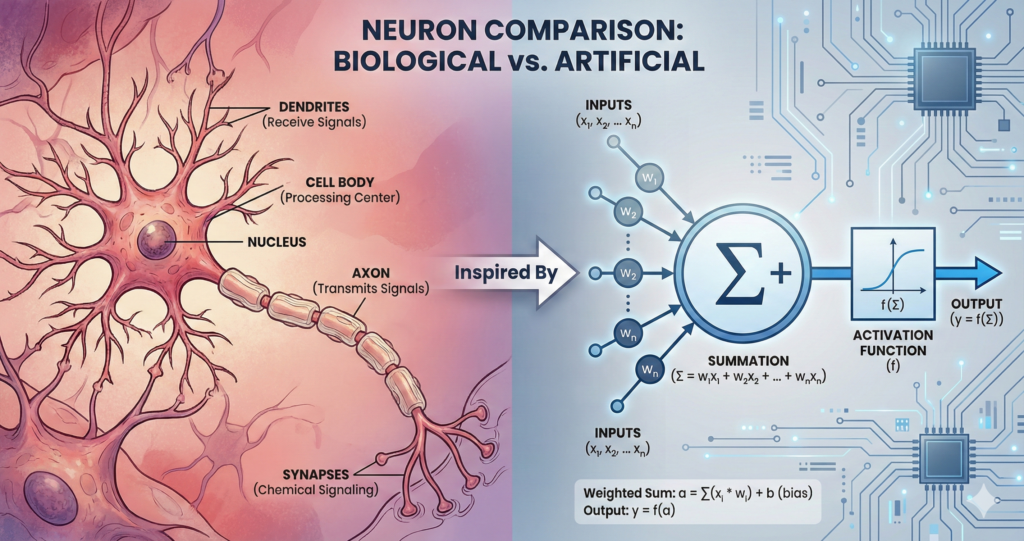
Your brain has ~86 billion neurons. Each neuron:
- Receives signals from other neurons (through dendrites)
- Processes the signal (in the cell body)
- Decides: Is this signal strong enough to pass on?
- Sends signal forward (through axon) to next neurons
Example: Touching a hot pan
- Touch receptors (neurons) in your finger detect heat → Send signal
- Sensory neurons receive signal → Pass it to spinal cord
- Spinal neurons process: “Hot = danger!” → Send signal to muscles
- Motor neurons activate → Your hand pulls away
Total time: 0.1 seconds (that’s 100 milliseconds!)
The key insight: Each neuron doesn’t do much alone. But 86 billion neurons working together = You can read this, understand it, remember it, and decide if you agree!
Artificial Neural Networks copy this exact structure (but with way fewer “neurons”).
The Artificial Neural Network: Structure Breakdown
The Basic Architecture
An Artificial Neural Network (ANN) has 3 types of layers:
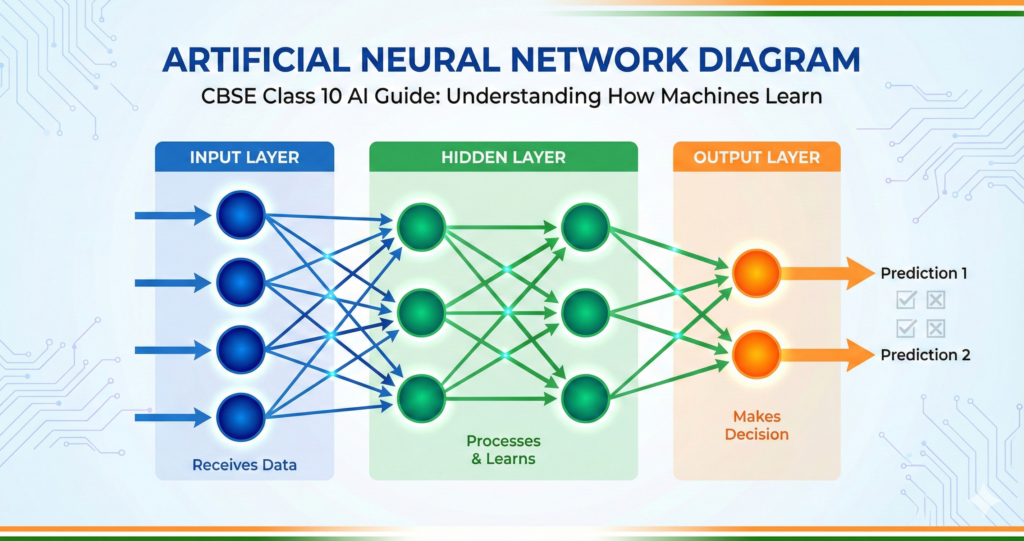
INPUT LAYER → HIDDEN LAYER(S) → OUTPUT LAYER
Let me explain each:
Layer 1: The Input Layer
Job: Receive data from the outside world
How it works:
- Each “neuron” in this layer = one piece of information
- Just holds data, doesn’t process it
- Passes data to the next layer
Example: Email Spam Detector
Input Layer has 3 neurons:
- Neuron 1: Number of exclamation marks (!!!)
- Neuron 2: Contains word “free”? (Yes/No)
- Neuron 3: Sender is in contacts? (Yes/No)
That’s it! Input layer is simple – just data entry points.
Layer 2: The Hidden Layer(s) (Where the Magic Happens)
Job: Process information and find patterns
How it works:
- Takes inputs from previous layer
- Each neuron has “weights” (importance levels) and “bias” (threshold)
- Applies mathematical function: (Input × Weight) + Bias
- Passes result through “activation function” (decides if signal is strong enough)
- Sends processed signal to next layer
This is where learning happens! The network adjusts weights and biases during training to get better at predictions.
Why “Hidden”? Because we (humans) can’t see what’s happening inside. Even AI engineers sometimes don’t know exactly what patterns each hidden neuron learned. That’s why Neural Networks are called “black boxes.”
How many hidden layers?
- Simple problems: 1-2 hidden layers
- Complex problems (like image recognition): 10-100+ hidden layers (this is called “Deep Learning”)
Example: Email Spam Detector (continued)
Hidden Layer has 2 neurons:
Hidden Neuron 1 might learn: “If lots of !!! AND has word ‘free’ → Probably spam signal = HIGH”
Hidden Neuron 2 might learn: “If sender in contacts → Probably not spam signal = LOW”
Layer 3: The Output Layer
Job: Give the final answer
How it works:
- Receives signals from last hidden layer
- Combines them to make final decision
- Number of neurons = number of possible answers
Example: Email Spam Detector (final)
Output Layer has 2 neurons:
- Neuron 1: Probability it’s SPAM (e.g., 85%)
- Neuron 2: Probability it’s NOT SPAM (e.g., 15%)
Decision: Higher probability wins → Email goes to spam folder!
How Neural Networks “Learn” (The Training Process)
This is where it gets interesting. How does a Neural Network go from “random guesses” to “accurate predictions”?
Step-by-Step Training Process
Step 1: Initialize with Random Weights
When you first create a Neural Network, it’s like a newborn baby’s brain – all the connections (weights) are random. It will make terrible predictions.
Example: Show it a cat picture → It says “Dog” (wrong!)
Step 2: Forward Propagation (Making a Guess)
- Input data flows through the network
- Each layer processes and passes data forward
- Output layer gives a prediction
Example:
- Input: Cat image (pixels as numbers)
- Processing: Hidden layers analyze edges, shapes, patterns
- Output: “This is a Dog” (70% confidence)
Step 3: Calculate Error (How Wrong Was I?)
Compare prediction with actual answer:
- Predicted: “Dog”
- Actual: “Cat”
- Error = HUGE!
Step 4: Backpropagation (Learn from Mistakes)
This is the learning step!
The network traces back through all layers and adjusts weights:
- “Hmm, I was wrong. Which neurons messed up?”
- “This neuron gave too much importance to ‘floppy ears’ (dog feature)”
- “Let me reduce that weight and increase weight for ‘pointy ears’ (cat feature)”
It’s like a student reviewing a failed test:
- Sees which questions they got wrong
- Studies those topics more carefully
- Adjusts their understanding
Step 5: Repeat Thousands of Times
Show the network 10,000 cat and dog images. Each time:
- Make prediction → Calculate error → Adjust weights
After 10,000 examples, the network becomes really good at detecting cats vs dogs!
This is called “training” a Neural Network.
The Key Concepts: Weights, Bias & Activation
Let me explain these three terms that appear in every neural networks class 10 exam:
Weights (How Important Is This Input?)
Think of weights like volume knobs.
Example: Predicting if a movie is good
- Input 1: IMDB rating → Weight = 0.8 (very important!)
- Input 2: Number of explosions → Weight = 0.2 (less important)
High weight = “Listen carefully to this input!” Low weight = “This input doesn’t matter much”
During training, the network adjusts these weights to improve predictions.
Bias (The Starting Point)
Think of bias like the thermostat in your room.
Even with no inputs, some neurons should be “more active” than others. Bias sets that baseline.
Example: A neuron detecting “spam email” might have positive bias (assuming more emails are spam than not).
Formula (this appears in exams):
Output = (Input₁ × Weight₁) + (Input₂ × Weight₂) + ... + Bias
Don’t worry about calculating – just understand: Weights + Bias = How each neuron decides what signal to send
Activation Function (Should I Fire or Not?)
After calculating (Inputs × Weights + Bias), the neuron asks: “Is this result strong enough to pass on?”
Activation Function is like a filter that decides.
Common Activation Functions:
ReLU (Rectified Linear Unit) – Most popular:
- If result < 0 → Output = 0 (don’t fire)
- If result > 0 → Output = result (fire!)
Sigmoid:
- Converts any number to value between 0 and 1
- Useful for “probability” outputs (e.g., 0.85 = 85% sure)
Tanh:
- Similar to Sigmoid but outputs between -1 and 1
You don’t need to calculate these – just know they exist and why!
Why Activation Functions Matter: Without them, Neural Network = just a fancy calculator doing multiplication and addition. With them, Neural Network = can learn complex, non-linear patterns (like recognizing faces in any angle/lighting)
Real Example: Handwritten Digit Recognition (0-9)
Let’s walk through a complete neural networks class 10 example: recognizing handwritten digits.
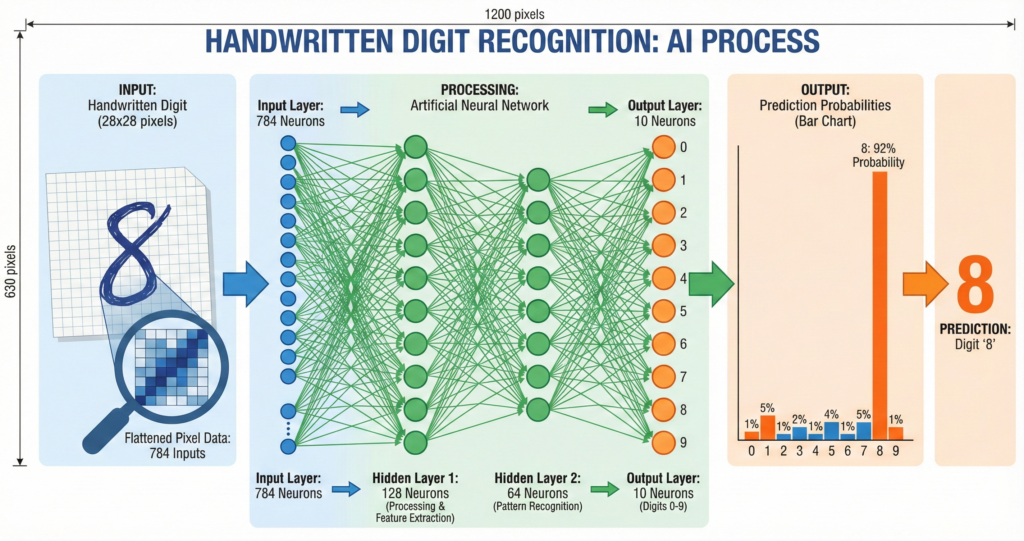
The Problem
You write number “8” on paper. Scan it. Can AI recognize it’s an “8”?
Challenge: Everyone writes “8” differently:
- Some people draw two circles
- Some draw one continuous line
- Different sizes, angles, thickness
Solution: Neural Network!
Step 1: Input Layer
Input: Image of handwritten digit (28×28 pixels = 784 pixels total)
Each pixel = one input neuron (holds pixel brightness value 0-255)
So Input Layer has 784 neurons (one per pixel)
Step 2: Hidden Layers
Hidden Layer 1 (128 neurons):
- Detects basic features: edges, curves, corners
- Neuron 1 might activate for “horizontal line at top”
- Neuron 2 might activate for “curve at bottom”
- …and so on
Hidden Layer 2 (64 neurons):
- Combines basic features into patterns
- Neuron 1 might activate for “two circles stacked” (could be 8 or B)
- Neuron 2 might activate for “vertical line with curves” (could be 2 or 3)
Step 3: Output Layer
Output Layer has 10 neurons (one for each digit 0-9)
After processing, each neuron shows probability:
- Neuron for “8”: 0.92 (92% confident)
- Neuron for “3”: 0.05 (5% confident)
- Neuron for “0”: 0.02 (2% confident)
- All others: ~0%
Prediction: It’s an “8”! ✅
How Did It Learn?
Training data: 60,000 handwritten digit images (with correct labels)
Process:
- Show digit “8” written by Person A → Network guesses
- Calculate error
- Adjust weights to get better
- Show digit “8” written by Person B → Network guesses again
- Calculate error
- Adjust weights…
After 60,000 examples, the network knows:
- “Two circles” usually = 8
- “One circle at top” usually = 0
- “Curved top + straight bottom” usually = 5
Accuracy: 98%+ (better than many humans!)
Introduction to CNN (Convolutional Neural Networks)
Now that you understand Neural Networks, let’s talk about CNN – a special type designed for images.
Why Regular Neural Networks Struggle with Images
Problem: Images have TONS of pixels.
A small 224×224 color image = 224 × 224 × 3 (RGB) = 150,528 pixels
If each pixel = one input neuron, you need 150,528 input neurons!
Then if first hidden layer has 1000 neurons, you need 150 million connections (weights) just between first two layers!
This is:
- Computationally expensive (slow)
- Memory-intensive (crashes computers)
- Prone to overfitting (memorizes training data instead of learning patterns)
Solution: Convolutional Neural Networks (CNN)
What Makes CNN Different?
CNN doesn’t look at every pixel individually. Instead, it looks at small patches of the image.
Think of it like:
- Regular NN: Reading a book letter by letter
- CNN: Reading a book word by word (much faster, same understanding!)
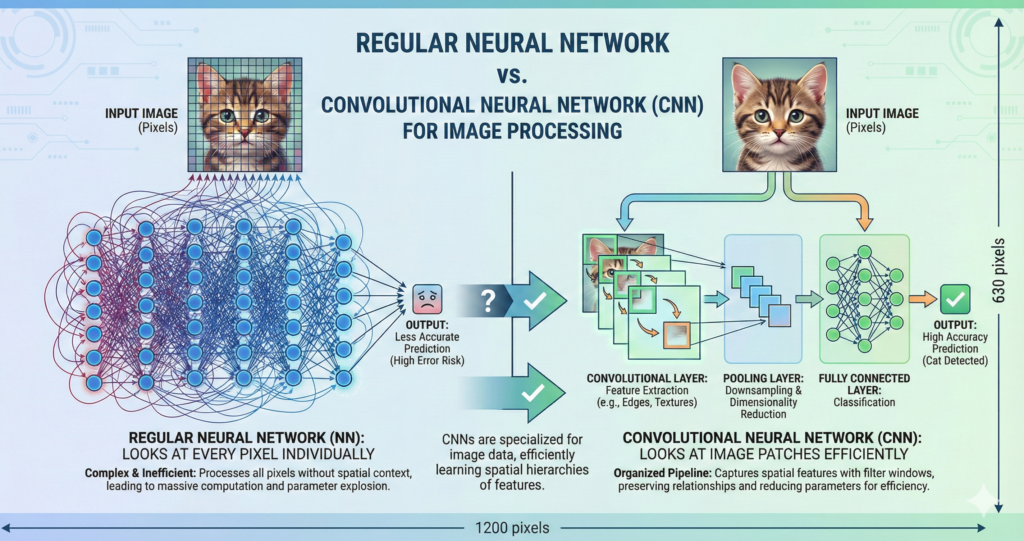
CNN has special layers designed for images:
- Convolutional Layer (finds features like edges, shapes)
- Pooling Layer (reduces size, keeps important info)
- Fully Connected Layer (makes final decision – just like regular NN)
Let’s break down each:
CNN Layer 1: Convolutional Layer (Feature Detection)
What Is Convolution?
Convolution = Sliding a small “filter” across the image to detect patterns
[INSERT IMAGE 4: Convolution Operation Visual]
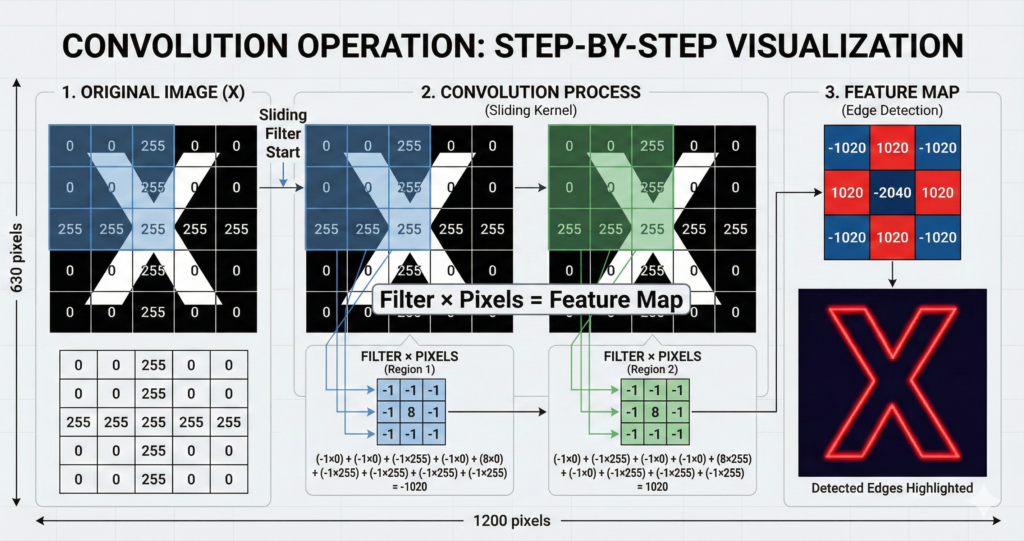
Step-by-step:
- Take a small grid (filter/kernel) – usually 3×3 or 5×5
- Place it on top-left of image
- Multiply filter values with pixel values underneath
- Add up all results = one number
- Slide filter one pixel to the right → Repeat
- When you reach right edge, go to next row
- Result = Feature Map (shows where that pattern appears in image)
Example: Edge Detection
Filter for detecting vertical edges:
[-1  0  1]
[-1  0  1]
[-1  0  1]
When you slide this across an image:
- Area with vertical edge → High response (bright in feature map)
- Flat area → No response (dark in feature map)
That’s how CNN “sees” edges!
Different filters detect different things:
- Filter A: Vertical edges
- Filter B: Horizontal edges
- Filter C: Diagonal lines
- Filter D: Curves
- … and so on
One Convolutional Layer uses many filters (typically 32-64 filters)
Each filter creates one feature map. So after one convolutional layer, you have 32-64 feature maps showing different patterns!
CNN Layer 2: Pooling Layer (Downsampling)
What Is Pooling?
Pooling = Reducing image size while keeping important information
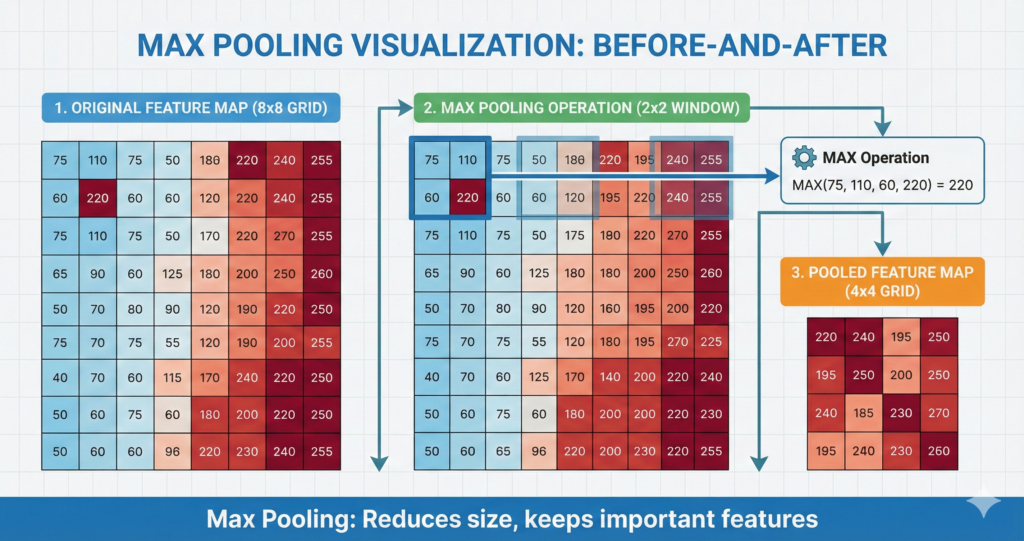
Why we need it:
- Original image: 224×224 = 50,176 pixels
- After 32 filters: 32 feature maps of 224×224 = 1.6 million values!
- Too much data to process efficiently
Solution: Pooling shrinks each feature map.
Types of Pooling
Max Pooling (Most Common):
Take a 2×2 window:
[155  180]
[120  200]
Pick the MAXIMUM value = 200
Move window → Repeat
Result: Feature map becomes 4× smaller (222×222 → 111×111)
Why Maximum? Because we care about “strongest response” (where the feature definitely exists), not average.
Average Pooling: Same thing, but take average instead of max.
Less common because it dilutes strong signals.
Why Pooling Helps
- Reduces computation (smaller = faster)
- Makes detection “location-invariant”
- If edge appears at pixel 50 or pixel 51, doesn’t matter – pooling treats them the same
- This makes CNN robust to slight changes in position
- Prevents overfitting (less data = less chance of memorizing)
CNN Layer 3: Fully Connected Layer (Making Decision)
After multiple Convolutional + Pooling layers, we’ve extracted all important features.
Now we need to make a decision: What is this image?
Fully Connected Layer = Regular Neural Network layer (like we learned earlier)
It takes all the feature maps, flattens them into one long list of numbers, and processes through regular neurons to give final output.
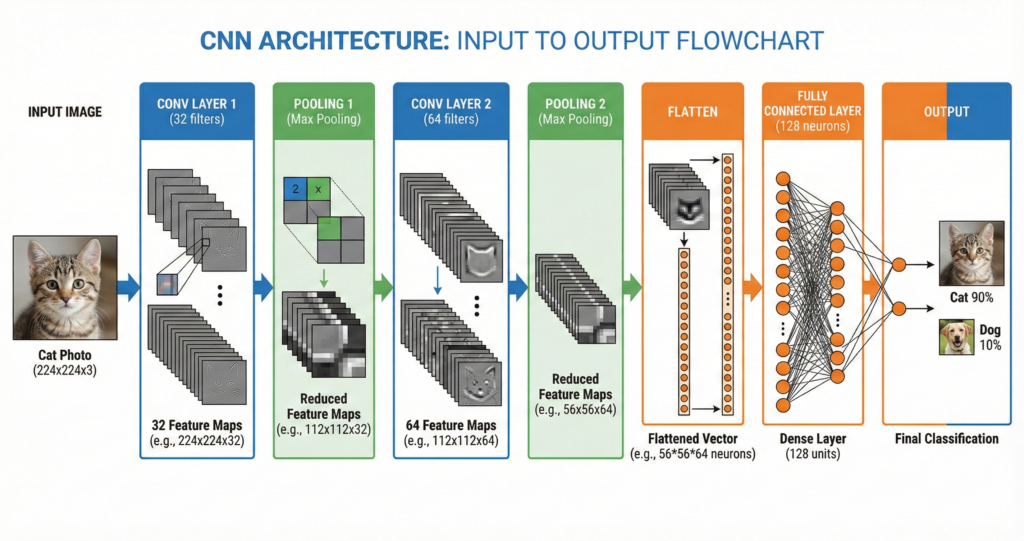
Example: Cat vs Dog Classifier
After convolution + pooling layers:
- Feature Map 1: Detected pointy ears (cat feature!)
- Feature Map 2: Detected whiskers (cat feature!)
- Feature Map 3: Detected floppy ears (dog feature!)
- Feature Map 4: Detected fur texture (both!)
Fully connected layer combines these:
- Lots of “cat features” detected → Output: CAT (90% confidence)
Complete CNN Example: Face Recognition
Let’s put it all together with a real-world neural networks class 10 example.
Problem: Your phone’s face unlock. How does it recognize YOUR face?
Step-by-Step CNN Process
Step 1: Input Layer
- Camera captures your face: 224×224×3 (RGB) image
- Input Layer receives 150,528 pixel values
Step 2: First Convolutional Layer
- 32 filters (each 3×3) slide across image
- Filters detect: edges of face, corners of eyes, curve of mouth
- Output: 32 feature maps (222×222 each)
Step 3: First Pooling Layer
- Max pooling (2×2) reduces size
- Output: 32 feature maps (111×111 each)
- Size reduced by 75%, important features kept!
Step 4: Second Convolutional Layer
- 64 filters detect higher-level patterns
- Combines edges into: “eye shape”, “nose shape”, “jaw line”
- Output: 64 feature maps
Step 5: Second Pooling Layer
- Further reduction
- Now we have abstract representation of face features
Step 6: Fully Connected Layers
- Flatten all feature maps into one long list
- Hidden layer 1 (128 neurons): Combines features
- Hidden layer 2 (64 neurons): Final processing
- Output layer (1000 neurons): Each neuron = one person’s face
Step 7: Output
- Neuron for “You”: 0.98 (98% confident)
- Neuron for “Your sibling”: 0.01
- All others: ~0
Result: Phone unlocks! 🔓
Training: Phone was shown your face 100+ times during setup (remember those different angles?). That’s training data!
Key Differences: ANN vs CNN (Exam Question!)
This comparison appears in almost EVERY neural networks class 10 exam:
| Feature | ANN (Artificial Neural Network) | CNN (Convolutional Neural Network) |
|---|---|---|
| Best For | Tabular data (numbers in tables) | Image/Video/Spatial data |
| Input | Any data (flattened to 1D) | Images (2D or 3D) |
| Special Layers | None – just Input, Hidden, Output | Convolutional, Pooling layers |
| Connections | Every neuron connects to every neuron in next layer (fully connected) | Local connections (neurons only connect to small region) |
| Number of Parameters | Very high (millions) | Lower (shared weights in filters) |
| Speed | Slower for images | Faster for images |
| Feature Extraction | Manual (you decide what features matter) | Automatic (CNN learns features) |
| Example Use | Email spam, sales prediction, grade prediction | Face recognition, object detection, medical imaging |
Memory tip for exams:
- ANN = All-purpose Neural Network (works for everything, not specialized)
- CNN = Designed for Camera/Computer Vision tasks
Real-World CNN Applications
1. Medical Diagnosis
Problem: Detect cancer from X-ray images
CNN’s job:
- Layer 1: Detect edges of bones/organs
- Layer 2: Identify normal vs abnormal tissue patterns
- Layer 3: Locate potential tumors
- Output: “Tumor detected in upper-left lung” (with 87% confidence)
Impact: CNNs can detect certain cancers better than human doctors!
2. Self-Driving Cars
Problem: Car needs to “see” road, pedestrians, traffic signs
CNN’s job:
- Multiple CNNs run simultaneously
- CNN 1: Detects lane markings
- CNN 2: Detects other vehicles
- CNN 3: Detects pedestrians
- CNN 4: Reads traffic signs
- All outputs combined → Car decides: brake, turn, accelerate
Tesla Autopilot uses 8 cameras + 8 CNNs processing 30 frames per second!
3. Social Media Filters
Problem: Snapchat/Instagram needs to find your face and add dog ears
CNN’s job:
- Detect face location in image
- Identify key points: eyes, nose, mouth, ears
- Track face movement in real-time (30 FPS)
- Overlay filter aligned to face points
This happens on your phone in real-time! That’s how powerful CNNs are.
4. Google Photos Search
Ever searched “beach” in Google Photos and it finds all your beach pictures?
CNN’s job:
- Scanned every photo in your library
- Detected objects: sand, water, umbrella, people in swimwear
- Tagged photo as “beach scene”
- When you search, retrieves all “beach” tagged photos
No manual tagging needed! CNN did it automatically.
Common Mistakes Students Make (Avoid These!)
Mistake #1: “Neural Network = Brain”
Wrong: “Neural Networks work exactly like human brain”
Correct: “Neural Networks are inspired by the brain but much simpler”
Why it matters: Examiners will deduct marks if you say “Neural Network = Human Brain”
Your answer should say: “Neural Networks are machine learning models inspired by the biological structure of the human brain, but they are mathematical approximations, not actual brains.”
Mistake #2: Confusing Layers
Wrong: “Input layer processes data”
Correct: “Input layer only HOLDS data. Hidden layers PROCESS it”
Remember:
- Input = Receiving department (just accepts data)
- Hidden = Factory floor (where work happens)
- Output = Shipping department (sends final product)
Mistake #3: “More Layers = Always Better”
Wrong: “100 hidden layers will make the best AI!”
Correct: “Too many layers can cause overfitting (memorizing instead of learning)”
Right approach:
- Simple problem (like email spam): 1-2 hidden layers enough
- Complex problem (like face recognition): 10-50 layers
- Balance is key!
Mistake #4: Forgetting to Draw Diagrams
In exams, questions often say: “Explain Neural Network with diagram“
If you write 10 perfect lines but NO diagram = Max 2/4 marks!
Always draw:
- Three layers (Input, Hidden, Output)
- Circles for neurons
- Arrows showing connections
- Labels
Even a simple diagram gets you marks!
Exam Strategy: How to Score Full Marks
For 4-Mark Questions
Question pattern: “Explain the structure of Artificial Neural Networks with a diagram”
Perfect Answer Structure:
Part 1: Definition (1 mark) “An Artificial Neural Network (ANN) is a machine learning model inspired by the human brain’s structure, consisting of interconnected nodes (neurons) organized in layers.”
Part 2: Diagram (1 mark) [Draw Input → Hidden → Output with neurons and connections]
Part 3: Layer Explanation (1.5 marks)
- Input Layer: Receives data, no processing
- Hidden Layer(s): Processes data using weights and biases, applies activation function
- Output Layer: Produces final prediction/classification
Part 4: Learning Process (0.5 marks) “The network learns by adjusting weights through backpropagation based on training data.”
Total: 4/4 marks ✅
For 2-Mark Questions
Common question: “Differentiate between ANN and CNN”
Perfect Answer:
“ANN (Artificial Neural Network) is suitable for any type of data and uses fully connected layers. CNN (Convolutional Neural Network) is specialized for image data and uses convolutional and pooling layers to automatically extract features. CNN is more efficient for computer vision tasks.”
(Write in table format if possible for bonus presentation marks!)
For MCQs
Common MCQ patterns:
Q: Which layer in Neural Network performs most of the processing? A) Input B) Hidden ✅ C) Output D) None
Q: What is the function of pooling layer in CNN? A) Increase image size B) Reduce image size ✅ C) Add colors D) Remove colors
Q: Which activation function is most commonly used? A) Sigmoid B) ReLU ✅ C) Tanh D) Linear
Pro tip: When stuck, eliminate obviously wrong answers first!
Practice Questions (Try These Now!)
Question 1 (4 marks)
“Explain how a Convolutional Neural Network (CNN) processes an image. Draw a diagram showing different layers.”
Answer:
A Convolutional Neural Network (CNN) processes images through specialized layers:
1. Input Layer: Receives image as pixels (e.g., 224×224×3 for RGB image)
2. Convolutional Layer: Applies multiple filters (kernels) that slide across the image to detect features like edges, shapes, and patterns. Each filter produces a feature map.
3. Pooling Layer: Reduces the size of feature maps using max pooling or average pooling, retaining important information while decreasing computational load.
4. Additional Conv/Pool Layers: Extract higher-level features by repeating the process.
5. Fully Connected Layer: Flattens the feature maps and processes them like a regular neural network to make final classification.
6. Output Layer: Produces the final prediction (e.g., cat vs dog).
CNNs are efficient for image recognition because they use local connections and shared weights, reducing parameters compared to regular neural networks.</details>
Question 2 (2 marks)
“What is the role of activation function in Neural Networks?”
Answer:
The activation function determines whether a neuron should be activated (fire) or not based on the weighted sum of inputs. It introduces non-linearity into the network, enabling it to learn complex patterns. Common activation functions include ReLU (outputs 0 for negative values, keeps positive values), Sigmoid (outputs between 0-1), and Tanh (outputs between -1 to 1). Without activation functions, neural networks would only perform linear operations and couldn’t solve complex problems.
Question 3 (4 marks)
“How does a Neural Network learn? Explain the training process.”
Answer:
Neural Networks learn through a process called training, which involves:
1. Forward Propagation: Input data flows through the network layer by layer. Each neuron applies weights to inputs, adds bias, and passes through activation function to produce output.
2. Loss Calculation: The network’s prediction is compared with actual answer using a loss function (error calculation). This measures how wrong the prediction was.
3. Backpropagation: The error is propagated backwards through the network. The algorithm calculates how much each weight contributed to the error.
4. Weight Update: Weights and biases are adjusted using an optimization algorithm (like Gradient Descent) to reduce error. The amount of adjustment is controlled by “learning rate.”
5. Iteration: Steps 1-4 repeat thousands of times with different training examples. Over time, weights adjust to minimize error, and the network becomes accurate at predictions.
This process is called “supervised learning” because we provide correct answers (labels) during training.</details>
Quick Reference: Terms You Must Know
| Term | Definition | Example |
|---|---|---|
| Neuron | Basic unit of neural network; processes input and produces output | One circle in network diagram |
| Weight | Importance given to each input connection | How much to trust “high IMDB rating” when predicting good movie |
| Bias | Baseline activation level of neuron | Starting point before considering inputs |
| Activation Function | Decides if neuron fires based on input | ReLU: if input < 0, output = 0 |
| Forward Propagation | Data flowing from input to output | Making a prediction |
| Backpropagation | Error flowing backward to adjust weights | Learning from mistakes |
| Epoch | One complete pass through all training data | If you have 1000 training images, 1 epoch = showing all 1000 once |
| Feature Map | Output of applying one filter in CNN | Image showing where edges are detected |
| Kernel/Filter | Small grid (3×3 or 5×5) that slides over image | Edge detector, curve detector |
| Stride | How many pixels filter moves at a time | Stride=1 means move 1 pixel; Stride=2 means move 2 pixels |
| Padding | Adding border pixels to preserve image size | Prevents image from shrinking too much |
Neural Networks vs Deep Learning (Clear the Confusion!)
Students often ask: “What’s the difference between Neural Networks and Deep Learning?”
Simple answer:
Neural Network = The MODEL (the structure with layers) Deep Learning = Neural Network with MANY layers (typically 10+)
Analogy:
- Neural Network = Building
- Deep Learning = Skyscraper (tall building with many floors)
When is it “Deep”?
- 1-2 hidden layers = Shallow Neural Network
- 3-9 hidden layers = Neural Network
- 10+ hidden layers = Deep Learning
Deep Learning examples:
- GPT (ChatGPT): 96+ layers
- ResNet (Image Recognition): 152 layers
- AlphaGo (Beat world champion): 13 layers
Your Class 10 AI syllabus covers:
- Basic Neural Networks (3 layers: Input, Hidden, Output)
- Introduction to Deep Learning concept
- CNN as example of Deep Learning for images
Resources to Learn More
Interactive Tools (Play with Neural Networks!)
TensorFlow Playground
- URL: playground.tensorflow.org
- What it does: Visual, interactive Neural Network you can train in browser
- Why it’s awesome: See how changing layers, neurons, learning rate affects results
- Spend 30 minutes here = Understand NNs better than 3 hours of textbook reading!
Teachable Machine
- URL: teachablemachine.withgoogle.com
- What it does: Build your own image/sound/pose classifier (uses CNN)
- Project idea: Create a hand gesture recognizer for your AI project!
Quick, Draw!
- URL: quickdraw.withgoogle.com
- What it does: Game where AI guesses your drawings
- Why it’s useful: Shows how CNN recognizes sketches in real-time
YouTube Channels (Visual Learning)
3Blue1Brown – Neural Networks Series
- Best visual explanations of Neural Networks
- 4 videos, ~1 hour total
- Animated, intuitive, perfect for visual learners
CodeBasics – Neural Networks Playlist
- Explains with Python code examples
- Good if you want to see practical implementation
AISkillsIndia.in Resources
Related Guides:
- Complete Class 10 AI Guide – Full syllabus overview
- Confusion Matrix Explained – Evaluation metrics
- Computer Vision Basics – Before learning CNN
Practical Tutorials:
Exam Prep:
FAQ: Your Questions Answered
Q1: Do I need to know the math behind Neural Networks?
A: No! CBSE Class 10 AI focuses on concepts, not complex math. You need to understand:
- ✅ What weights and bias do (conceptually)
- ✅ Why activation functions exist
- ✅ How training adjusts weights
You DON’T need to:
- ❌ Calculate derivatives for backpropagation
- ❌ Solve matrix multiplication
- ❌ Implement gradient descent from scratch
If the question says “Explain how weights are adjusted,” just write: “During training, weights are adjusted using backpropagation algorithm which calculates error and updates weights to minimize that error.”
That’s enough for full marks!
Q2: What’s the difference between CNN and RNN?
A: Great question! RNN (Recurrent Neural Network) isn’t in Class 10 syllabus, but here’s quick comparison:
CNN: For images/spatial data (pixels arranged in grid)
- Example: Face recognition, object detection
RNN: For sequence/time-series data (data with order)
- Example: Speech recognition, language translation, stock price prediction
Memory trick:
- CNN = Camera (images)
- RNN = Record player (sequences over time)
Q3: How many neurons should a Neural Network have?
A: There’s no fixed answer! It depends on problem complexity.
General guidelines:
- Input neurons = Number of features in data
- Hidden neurons = Usually between input and output count (experiment!)
- Output neurons = Number of classes/predictions
Example – Email Spam:
- Input: 100 neurons (100 features like word count, sender, etc.)
- Hidden: 50 neurons
- Output: 2 neurons (Spam or Not Spam)
For exam questions: Don’t worry about exact numbers. Focus on explaining the concept.
Q4: Can Neural Networks make mistakes?
A: Absolutely! Even the best Neural Networks aren’t 100% accurate.
Why mistakes happen:
- Limited training data: If network never saw certain examples, it guesses
- Ambiguous cases: Sometimes even humans disagree (is this a cat or fox?)
- Bias in data: If training data is biased, network learns biased patterns
Example: A face recognition system trained mostly on light-skinned faces performs worse on dark-skinned faces (real problem in AI ethics!)
This is why evaluation metrics (Accuracy, Precision, Recall) matter! Learn more in our Confusion Matrix guide
Q5: What’s overfitting and underfitting?
Overfitting: Network memorizes training data instead of learning patterns
- Like a student who memorizes answers but doesn’t understand concepts
- High accuracy on training data, poor on new data
Underfitting: Network hasn’t learned enough
- Like a student who didn’t study enough
- Poor accuracy even on training data
Sweet spot: Network that learned patterns (not memorization) and generalizes to new data
Deep dive: Overfitting Explained
Your Action Plan: Mastering Neural Networks
This Week:
Day 1 (Today):
- [ ] Read this guide completely (you’re almost done!)
- [ ] Watch one 3Blue1Brown Neural Network video
- [ ] Draw a basic Neural Network diagram (Input-Hidden-Output) 3 times
Day 2:
- [ ] Play with TensorFlow Playground for 30 minutes
- [ ] Try different configurations (layers, neurons)
- [ ] Observe how changes affect learning
Day 3:
- [ ] Read textbook Unit 2 (Neural Networks section)
- [ ] Make notes in your own words
- [ ] Draw CNN architecture diagram
Day 4:
- [ ] Solve 10 MCQs on Neural Networks
- [ ] Practice 2 long-answer questions (4 marks each)
- [ ] Get feedback from teacher/friend
Day 5:
- [ ] Use Teachable Machine to build image classifier
- [ ] Train it to recognize 3 objects (pen, phone, notebook)
- [ ] Screenshot your trained model (might use for project!)
Day 6-7:
- [ ] Revise key terms (weights, activation, CNN layers)
- [ ] Explain Neural Networks to a friend (best way to solidify understanding!)
- [ ] Make flashcards for quick revision
For Your Practical/Project:
Easy Project Idea: Image Classification using Teachable Machine/Lobe.ai
Steps:
- Choose 3-5 categories (fruits, flowers, hand gestures, etc.)
- Collect 50-100 images per category (use phone camera!)
- Upload to Teachable Machine
- Train model (takes 2 minutes!)
- Test accuracy
- Export model
- Write project report
This uses CNN under the hood! Perfect for demonstrating neural networks class 10 concepts.
Full tutorial: Computer Vision Project Guide
Final Words: From Confusion to Confidence
Look, I get it. When you started reading about neural networks class 10, it probably felt like reading a different language. Terms like “backpropagation,” “convolutional layers,” and “activation functions” sounded intimidating.
But now? You understand:
- ✅ How Neural Networks mimic the brain (but simpler)
- ✅ The three layers and what each does
- ✅ How training adjusts weights to improve predictions
- ✅ Why CNN is perfect for images
- ✅ Real-world applications from face unlock to self-driving cars
You’re no longer confused. You’re confident. 💪
This topic is worth 4-6 marks in theory + practical demos + viva. Master it, and you’re well on your way to 45+ overall.
Remember: Even AI researchers sometimes struggle to explain what’s inside a Neural Network’s hidden layers. The fact that you, a Class 10 student, understand the core concepts? That’s impressive.
Now go ace that exam! 🚀
Found this helpful? Share with your classmates. Let’s make Neural Networks less scary for everyone.
Related Guides to Read Next
Must-Read After This:
- Computer Vision Basics – Understand images before CNN
- Convolution Operation Explained – Deep dive into CNN
- Types of Machine Learning – Where Neural Networks fit
For Your Project:
4. AI Project Ideas – Build something with Neural Networks
5. Orange Data Mining for CNN – No-code implementation
6. Teachable Machine Tutorial – Build image classifier
Exam Preparation:
7. Complete Class 10 AI Syllabus – Big picture overview
8. Confusion Matrix Guide – Evaluation metrics
9. 50 MCQs Practice – Test your understanding
Last updated: January 30, 2026 for Session 2025-26 Covers: CBSE Class 10 AI Unit 2 (Neural Networks & Deep Learning)